FTC Scouting Guide — DECODE
Want to help our team at the tournament? Scouting is a fun way to get involved — you watch some matches and jot down what each robot does on a simple paper form. Even scouting a few matches can give us a real edge! Plus, learning what to look for will help you understand what’s going on in the game, which makes watching the matches a lot more fun.
You don’t need to know anything about robotics to scout. You don’t need to be perfectly accurate, either — just do your best! Even rough notes are useful. This guide will walk you through everything you need to know.
Why Scouting Helps
Scouting isn’t required for us to do well, but it can give us a bit of an advantage in two ways:
1. Qualification Match Strategy
During qualification matches, we’re paired with a different partner each time. Scouting tells us:
- What our opponents can do — If a robot scores a lot but only from one spot on the field, we may be able to play defense on them by blocking that spot
- What our partner can do — If our partner doesn’t have an autonomous routine that scores leave points, we may be able to help them set up a simple one before the match
- How many artifacts opponents typically score — so we know what we need to beat
2. Alliance Selection
After qualification matches, the top-ranked teams get to pick alliance partners for playoff matches. Good scouting data helps us:
- Know which teams are strong performers
- Identify teams whose strengths complement ours
- Avoid picking teams that have reliability issues
- Have a backup plan if our first-choice partner is taken
How a Match Works
Each match has 4 robots on the field — 2 on the red alliance and 2 on the blue alliance. The two alliances compete against each other. Each match has three phases:
1. Autonomous Period (30 seconds)
The robots run on their own — no human control. Robots can score leave points by moving off their launch line, and they can also score artifacts into the gate. Some teams don’t have an autonomous program at all, so their robot will just sit there. Robots can start with up to 3 preloaded artifacts.
2. Driver-Controlled / Teleop Period (2 minutes)
Drivers control the robots with game controllers. This is where most of the action happens. Robots collect artifacts (purple and green balls) and score them by launching them into the goal.
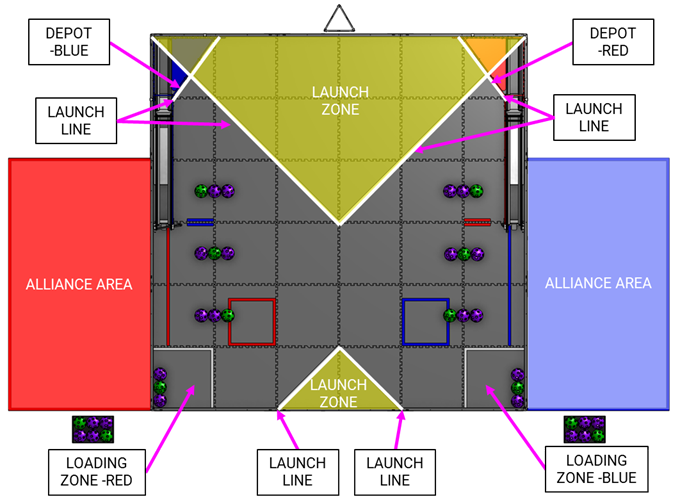
Robots can only launch from designated launch zones — the robot needs to be inside the zone or overlapping a launch line. There are two launch zones on each side of the field:
- Near launch zone — the large triangular area at the back of the field, near the goals. Most robots score from here.
- Far launch zone — the much smaller triangular area at the front of the field (audience side), farther from the goals. Robots that can score from the far zone are harder to defend because they have two places to shoot from.
Note: “near” and “far” refer to distance from the goal, not from the audience. The far zone is actually the one closest to the audience.
3. End Game (last 20 seconds)
During the last 20 seconds of teleop, robots may return to their base zone for bonus points — but they can also keep scoring artifacts, so there’s a strategic tradeoff. This is also when base zone protection kicks in — robots can’t contact an opponent in the opponent’s base zone (rule G427), or the opponent gets a major foul and automatic full-base points.
What to Watch For When Scouting
You’ll be watching one robot at a time during each match. Here’s what to record:
Tracking Shots
The most important thing to track is shot attempts. For each shot, mark ✓ if it went in and ✗ if it missed. Do this for both autonomous and teleop — just keep a running tally on the form. This gives us both accuracy and volume at a glance.
Example: ✓✓✗✓✓✓✗✓ = 6 made, 2 missed
During Autonomous (first 30 seconds)
- Where did the robot start? (Near or far side of the field)
- Did the robot move at all? Some teams don’t have an autonomous program — the robot just sits there.
- Did it score leave points? The robot must end auto not over any launch line. A robot that moves but ends up back on a line doesn’t get leave points.
- Track auto shots (✓/✗) — robots can start with 3 preloaded artifacts, so expect 0 shots (no auto or leave-only auto), up to 3 shots (preloaded), or more if they pick up additional artifacts with an intake.
- Did it move smoothly or have problems? (Got stuck, went the wrong way, etc.)
During Teleop (2 minutes)
- Track teleop shots (✓/✗) — start a new tally for teleop, separate from auto.
- Where do they score from? Note which launch zone(s) they use — near, far, or both. If they can only score from a small area (e.g., one specific spot in the near zone), they’re easier to play defense on. Robots that can score from multiple positions are harder to shut down.
- How fast is their cycle? A “cycle” is: pick up artifacts → drive to launch zone → score → repeat. Fast cyclers are valuable partners.
- Did they play defense? Some robots focus on blocking the other alliance instead of scoring. Were they effective at it?
- Did the robot return to base? (None / Partial / Full) — Robots may return to base for bonus points, but they can also keep scoring artifacts, so some teams skip parking.
- How did they respond to defense? If the other alliance played defense on them:
- Did they get flustered and stop scoring?
- Did they drive around the defender and keep scoring?
- Did they switch to a different scoring position?
- Human player activity — For robots without an intake, the human player loads artifacts in the loading zone. Watch how quickly and effectively the human player loads — a fast human player can partially make up for not having an intake.
- Intake effectiveness — For robots with an intake, does it pick up artifacts reliably, or does it fumble and need multiple attempts? A fast, reliable intake makes a big difference in cycle speed.
Robot Details (anytime — before, during, or after a match)
These don’t change between matches, so you only need to note them once per team:
- Drive type:
- Tank drive — wheels on each side turn independently. Can only drive forward/backward and turn in place. Less maneuverable.
- Mecanum drive — special wheels that let the robot strafe sideways and move in any direction. Much more maneuverable — better at playing defense and getting around defenders.
- Other — kiwi drive (3 omniwheels in a triangle), swerve drive, etc.
- Has intake? Robots with an intake can pick up artifacts off the field. Without one, they have to drive back to the loading zone for the human player to load them — much slower cycles.
General Observations
- Reliability: Did the robot break down, get stuck, disconnect, or stop moving?
- Driver skill: Did the drivers seem confident and in control?
- Speed: Was the robot fast or slow getting around the field?
- Any notable features: Anything that stood out — good or bad?
Tips for Scouting
- Watch one robot per match. Don’t try to track all 4 — you’ll miss things. Coordinate with other scouts so each robot is covered.
- It’s OK to estimate or leave things blank. Partial data is still useful — don’t stress about getting everything perfect.
- Note breakdowns. If a robot stops working mid-match, that’s critical information.
- Watch the whole match. End game parking is easy to miss if you look away.
- Use shorthand. Develop quick abbreviations on your form (✓ for yes, ✗ for no, etc.)
- Don’t worry about the score. The scoreboard shows alliance totals — your job is tracking the individual robot.
Scouting Form
Here’s the form you’ll be using. (Printable version — 2 per page)
FTC DECODE Scouting Form Event: 32314 Marcus Bartholomew the Third Senior
Autonomous (30 sec)
Teleop (2 min)
Robot Details
Overall
Using Scouting Data for Strategy
Before a Qualification Match
Look up the scouting sheets for the teams in your upcoming match:
Your partner:
- No auto / no leave? Talk to them before the match — we may be able to help them set up a simple autonomous that gets them off the launch line for free leave points.
- Strong scorer? Let them focus on scoring while we complement with defense or field coverage.
- Slow or unreliable? We may need to carry the scoring load — plan to play aggressively.
Your opponents:
- Scores only from one spot in the near zone? Consider playing defense — position our robot to block their scoring position.
- Scores from the far zone too? Harder to defend — focus on outscoring them instead.
During Alliance Selection
Use your collected scouting sheets to rank potential partners by:
- Consistency — a team that reliably scores 40+ every match is better than one that swings between 20 and 80
- Accuracy and volume — check their ✓/O tallies across matches
- Auto capability — leave points and auto scoring add up across matches
- Reliability — a team that broke down in 2 of 5 matches is risky
- Drive type — mecanum drives are more maneuverable for both scoring and defense
- Defense resilience — in playoffs, opponents will play more defense
- Complementary skills — if we’re strong at scoring, a partner who can play effective defense may be more valuable than a second scorer
Scoring Details
You don’t need to know this to scout — but if you’re curious about how points work, here’s the breakdown.
Artifacts (3 pts or 1 pt each)
Artifacts are the colored balls (purple and green) that robots collect and score. To score, a robot launches an artifact into the top of the goal. The artifact drops down through the goal, exits under an archway, and passes through the square (an opening in the gate). From there:
- Classified (3 pts) — the artifact transitions directly onto the ramp without rolling over any other artifacts already there. This is the main way to score.
- Overflow (1 pt) — the artifact passes through the square but rolls over one or more artifacts already on the ramp. This typically happens when the ramp is full. Teams can open the gate to release artifacts from the ramp, making room so that further artifacts score as classified instead of overflow.
Artifacts that miss the goal entirely or don’t pass through the square score nothing.
Artifacts can also be placed in the depot (a small area at the base of the goal) for 1 pt each, scored at the end of the match.
Pattern
Before each match, the obelisk is randomized to show a motif — a 3-color sequence of purple and green (e.g., green-purple-purple). This motif repeats 3 times to define the target colors for the 9 positions on the ramp.
At the end of auto and again at the end of teleop, each artifact on the ramp whose color matches the motif color for its position earns 2 bonus points. This is scored in addition to the classified/overflow points.
Leave (3 pts per robot)
Each robot that ends autonomous not over any launch line earns 3 points. A robot that moves but ends up back on a line doesn’t get leave points.
Base (End Game)
At the end of the match, robots may return to their base zone for bonus points:
| Status | Points |
|---|---|
| Not in base | 0 pts |
| Partially in base | 5 pts |
| Fully in base | 10 pts |
| Both alliance robots fully in base | 10 pts additional bonus |
For more about our FTC team, see the FTC team page.